Social media is constantly evolving, and most companies are progressing past the days of webinars and now utilize the “live” feature on their social channels. So if your company is looking for an excellent way to ramp up its social media, engage with followers, and reach a larger audience, “going live” is the way to go.
What Is Live Streaming?
If you don’t know, live streaming technology is how video content is streamed online. This technology applies to live, real-time, and even pre-recorded content- it’s essentially the internet’s version of live tv, but more accessible. Not to mention, “going live” holds your viewers’ attention up to 20 times longer than on-demand content. Thus, it’s an excellent way to reach a larger audience, grow your social media presence, and start converting.
There is a lot of competition on social media, so standing out from competitors on the platform is often difficult, not to mention time-consuming. Every day new competitors are signing up and looking for better ways to connect with their niche audience and drive revenue for their business. Some are even doing the same thing as you. So producing great content people want to follow is vital. And using all of the tools at your disposal, such as live streaming, is a great place to start. Live streaming also offers you the opportunity to stream on multiple platforms simultaneously aka multistreaming!
Multistreaming Capabilities Are a Thing!
Multistreaming is beneficial because each platform offers its own unique benefits and audience types. So instead of trying to decide whether you want to live stream on Facebook, TikTok, Instagram, or more, you can now reach them all at once. It helps broaden your audience as not everyone has a Facebook, LinkedIn or YouTube account. So, the more accounts you connect to, the better the opportunity is to raise brand awareness. But stay consistent with it. Organic growth creates brand loyalty and keeps the traffic coming.
Let’s Go Live – But How?
Let’s face it, only some people are tech-savvy, and learning to set up your first live stream can be confusing. You can’t just go to Facebook or Instagram, click “Start a Live,” and expect to multistream. There are steps you need to take and outside platforms you must utilize to connect your streams.
Platforms like Yellow Duck and Restream offer everything needed to start live streaming. So, if you’re ready to be more social media savvy, below are the steps to set up Yellow Duck and Restream.
Yellow Duck: Get the Most Out of your Instagram
“Going live” is a great way to increase audience engagement and cultivate a new following. However, Instagram is designed to cater to smartphones, and creating quality content from a PC or Mac wasn’t an option. Until now.
Yellow Duck allows you to go live on Instagram from your computer with Open Broadcaster Software (OBS), Streamlabs (SLOBS), Wirecast, or any streaming software that supports Real-Time Messaging Protocol (RTMP).
Streaming live on your pc is simple and similar to streaming on any other device.
With Yellow Duck, You Can:
- Use Instagram Live from any platform
- Stream to Instagram with OBS, Wirecast, or many others
- Your information is safe with Yellow Duck- they don’t store your login
- Yellow Duck is free to use
Follow three simple steps to start live streaming on your computer with Yellow Duck.
- Log into Instagram using Yellow Duck.
- Grab the Instagram stream key and RTMP URL.
- Copy into your encoder or streaming service.

After these steps are completed, push a button and stream live on Instagram, quickly grabbing the audience’s attention and crushing the competition. Easy, peasy, Instagram squeezy. Remember to do your market research to see what’s trending in your niche.
Now that we have filled you in on Yellow Duck, another great platform to try is Restream. Restream is used globally by professional and amateur gamers, Fortune 500 companies, media outlets, politicians, and celebrities to reach, engage and monetize audiences. In addition, Restream is continually working to nurture its product portfolio to empower creators to target and reach larger audiences.
Restream Allows You To:
One live 30+ destinations
Multistream to reach a larger audience
Upload and stream-automate / Stream recorded videos
Chat with viewers in one spot- no tab jumping
Measure and track analytics
Restream allows you to stream to Facebook Live, Youtube, Twitch, Tik Tok, etc.
Follow the steps below to get started.
- Sign up on Restream and log in.
- Click on “add channel,” then choose the service you want to stream to, connect, and enter the necessary RTMP URL stream key info.
- To stream to the IBM Watson Media Platform, select Custom Platform (RTMP). An additional cost will apply to use this feature.
- Once connected, the channel will appear in your dashboard, and you can toggle the availability by clicking on/off.
- Next, pick a server closest to your location- this generates an RTMP URL and stream key for your broadcasts-specific streaming service.
- Now open an encoding program such as OBS or Wirecast.
a) With Wirecast, select output/output settings.
b) Choose RTMP server as the output destination, then select ok.
c) Enter the RTMP URL into the address section of the output settings in Wirecast and the stream key into the stream section.
7. If you want to add RTMP server publishing points, select “add” under the RTMP server and repeat the above steps, or add your own IBM Watson Media RTMP URL and Stream Key.

- Add channels to restream → FB, IG, and Youtube
- Let’s Start with Facebook pages or personal FB page. I would choose the page that has the most followers.
- This will prompt you to select either a personal profile or public page to connect.
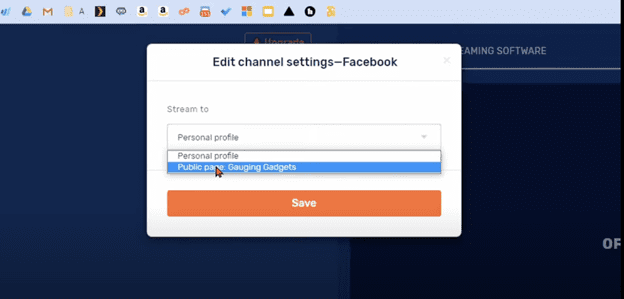
Continue by adding Instagram:
- Click add channel
- Go down the page and click RTMP

It will ask you to add a custom RTMP and Stream Key which you will copy and paste from yellowduck.tv
Login to your IG account through yellowduck.tv
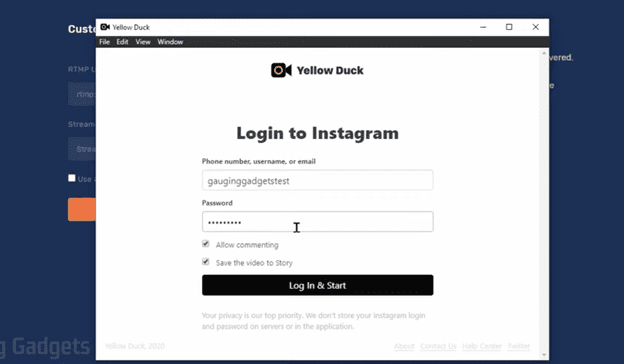
After you login, yellowduck will direct you to the page below, it contains the RTMP and Stream Key you will need to add to restream.io

Next you will see this and you will do the same steps for youtube (click add channel)

Make sure all three channels are toggled on.

Make sure you give restream access to your microphone and camera. If your using an external camera you have an option to change camera view on the gear settings and select what camera mode you would like to use.
Other awesome tools restream.io provides
→ Captions (subscribe on Youtube or social channel to follow you)
→ Add graphics like a logo overlay
→ Share a slideshow
Live Streaming Is a Hot Social Trend.
Social media trends are constantly changing, so it is vital to utilize all the tools available to you with social media. With Yellow Duck, you can use your desktop to create more engaging live content on Instagram and stand out more from the competition. And Restream, the option to stream live or pre-recorded content on multiple platforms, with a single chat option, is social media gold.
Brand Iron manages several client social media accounts and is also moving towards the “going live” option, and finds both Yellow Duck and Restream highly beneficial for reaching larger target audiences.
Do you have any questions about engaging and growing your social media accounts? Brand Iron is here to help so reach out to us any time.
Brand Iron is an independent, multi-faceted branding and marketing agency passionate about shaping businesses and transforming brands. We are a collective of independent thinkers, artists, and doers committed to forging unrivaled outcomes for our clients. And most recently, recognized as one of the best SEO firms in Colorado!

Krista Vachon
Content Writer
Krista was born and raised in Indiana but has been a Colorado resident since 1996. She is passionate about traveling, art, fishing, and anything outdoors. However, she discovered her love of writing early on in life.
She is a published poet and short story enthusiast with styles similar to Ernest Hemingway and Edgar Allan Poe. However, she wears many hats in the writing world. With over ten years of experience, Krista has a background in creative and marketing writing, including poetry, children’s content, copywriting, press releases, and so much more!
Before becoming a freelance writer for Brand Iron, she worked as the content writer for Fine Airport Parking in Denver and Tulsa, a freelancer for Garlic Media Group, and lead copywriter for Mad Hatter Marketing Agency.
Krista earned a B.A. in English, with a concentration in writing and a minor in journalism from MSU Denver.

Zahira Fernandez
Social Media Manager
Zahira was born in Orange County, California but lived in Las Vegas, Nevada, for 16 years. However, two years ago, she found her way to Breckenridge, Colorado, and eventually made her way to Denver after buying a condo.
Zahira is a seasoned traveler who spent time backpacking through 20 different countries. When she is not out globetrotting, she likes to fill her day with yoga, hiking, and spending time with her adorable fur baby, Shelby. But don’t be surprised if you run into her enjoying the sunshine at a local farmers market, a Red Rocks Amphitheater concert, or any other exciting outdoor activities Colorado offers.
If there is a challenge, Zahira is up for it. She lives by the quote, “If it doesn’t challenge you, it won’t change you.” Fred DeVito and “The only way to do great work is to love what you do.” Steve Jobs.
Zahira graduated from UNLV with a BA in Marketing and joined the Brand Iron team this year as the Social Media Manager.

CEO | Brand Champion
Michael Doyle has been changing the face of Brand Marketing for over two decades. He built a tech-based advertising agency, DNA Advertising, into a multi-million dollar company. Michael sold the company as part of a national IPO in 2000. Michael founded Brand Iron in 2002 and has since lent his expertise to hundreds of other businesses in dozens of industries around the world.